WordPress Accessibility Engine
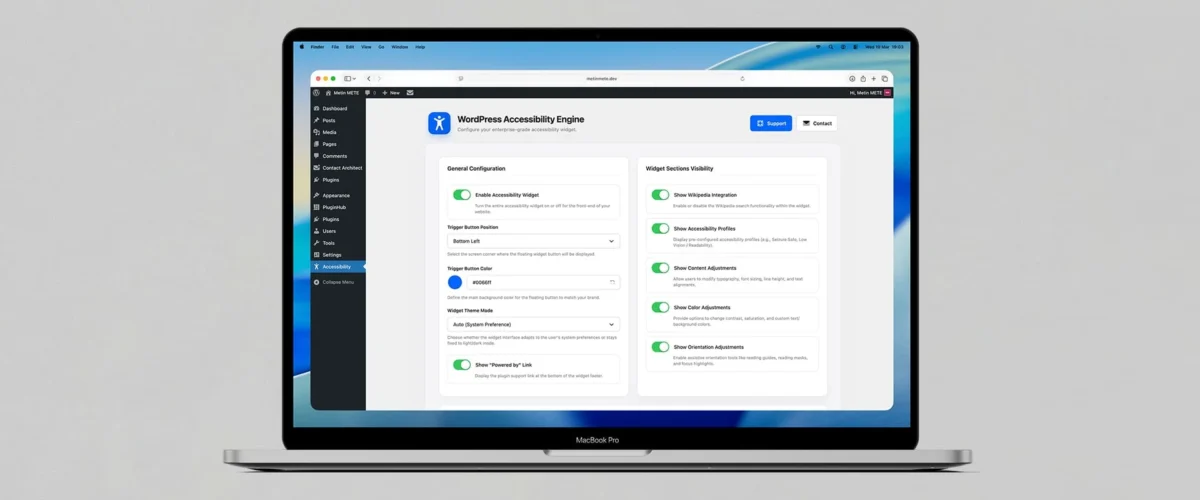
WordPress Accessibility Engine is a modern accessibility plugin for WordPress. First, it helps you provide on-page accessibility controls through a floating accessibility widget. In addition, it offers preset accessibility profiles, content adjustments, color controls, and orientation tools. As a result, visitors can personalize the browsing experience more easily and interact with your website with better comfort and clarity.
Instead of forcing every visitor to use the same visual and interaction settings, you can give them practical accessibility options directly on the front end. Moreover, the plugin includes tools for reading assistance, contrast adjustments, focus highlighting, and keyboard-friendly usage. Therefore, you can create a more inclusive experience for users with different accessibility needs.
Key capabilities
1) Floating accessibility widget + front-end controls
Enable a floating accessibility button on your website and let visitors open the accessibility panel instantly.
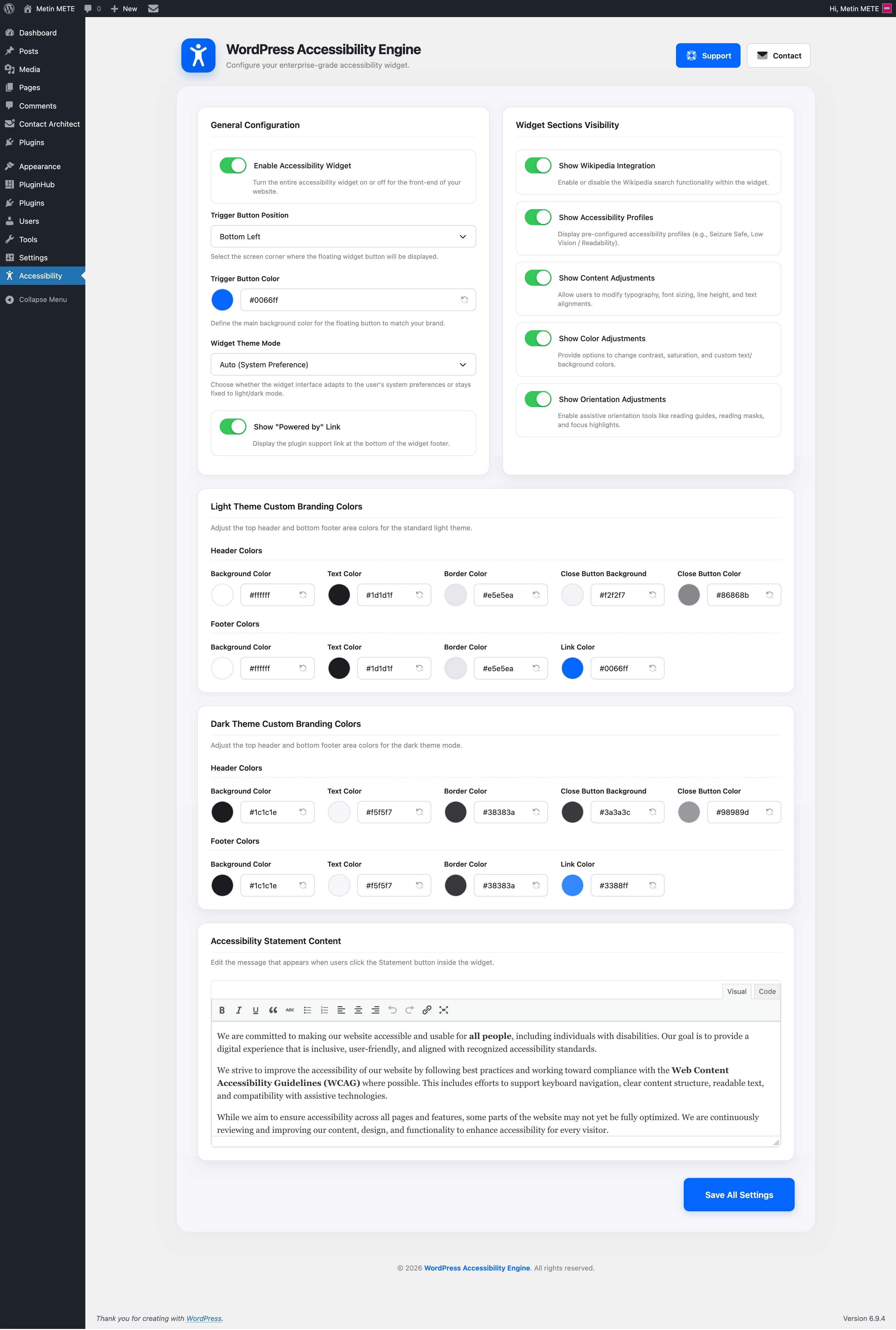
You can place the trigger in different screen corners and customize its position and color. This makes the tool easy to access while keeping it aligned with your site design.
2) Accessibility profiles (ready-made presets)
Help users activate multiple adjustments with a single click.
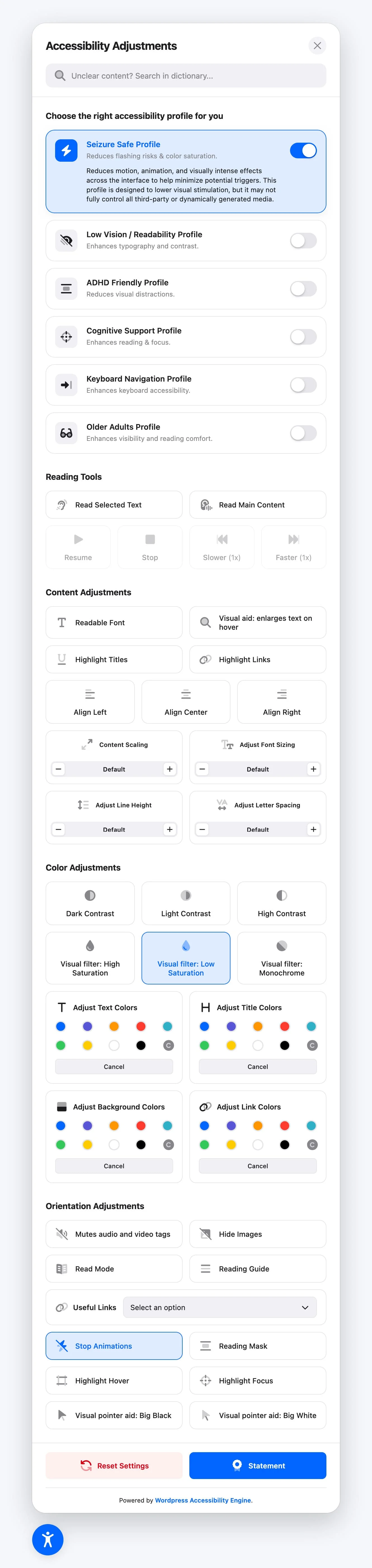
The plugin includes built-in profiles such as Seizure Safe Profile, Low Vision / Readability Profile, ADHD Friendly Profile, Cognitive Support Profile, Keyboard Navigation Profile, and Older Adults Profile. Therefore, visitors can apply a more suitable browsing setup without configuring every option manually.
3) Content adjustments: typography, spacing, alignment
Improve readability with practical content controls.
Users can change content scaling, activate a readable font, adjust font sizing, modify line height, change letter spacing, and switch text alignment. As a result, text-heavy pages become easier to read and follow.
4) Visual emphasis: highlight titles, links, and text magnifier
Guide attention to the most important elements on the page.
The plugin includes options like Highlight Titles, Highlight Links, and a Text Magnifier. This helps visitors notice key content faster and interact with links and headings with less visual effort.
5) Color adjustments: contrast, saturation, monochrome, custom colors
Give users more control over how your website looks.
They can switch between Dark Contrast, Light Contrast, High Contrast, High Saturation, Low Saturation, and Monochrome. In addition, the plugin supports custom adjustments for text colors, title colors, background colors, and link colors.
6) Orientation tools: reading guide, reading mask, focus tools, large cursors
Support users who need stronger on-screen guidance.
The plugin offers tools such as Reading Guide, Reading Mask, Highlight Hover, Highlight Focus, Big Black Cursor, and Big White Cursor. Therefore, visitors can navigate pages with better visual tracking and focus.
7) Reading assistance: hide images, read mode, stop animations, mute sounds
Reduce distractions and simplify content when needed.
Users can activate Hide Images, switch to Read Mode, Stop Animations, or use Mute Sounds. This is especially helpful for visitors who prefer calmer layouts and more focused reading environments.
8) Keyboard-friendly direction
Make front-end browsing more supportive for keyboard-based usage.
The plugin includes a dedicated Keyboard Navigation Profile together with focus-related support tools. As a result, visitors who rely on keyboard navigation can access a setup that is more compatible with their needs.
9) Accessibility statement inside the widget
Add an accessibility statement directly to the user interface.
The plugin includes a built-in Statement section, and you can edit its content from the admin area. This helps you communicate your accessibility commitment in a visible and user-friendly way.
10) Theme-aware interface: light, dark, auto + branding options
Match the accessibility panel to your website style more easily.
You can choose Auto, Always Light, or Always Dark mode. In addition, the plugin lets you customize header, footer, and color settings for both light and dark themes, including background, text, border, and link colors.
11) Saved user preferences (persistent front-end state)
Keep accessibility choices available across page views.
The plugin saves the active accessibility state in the browser, so selected adjustments can remain available while the visitor continues browsing. This creates a more consistent experience and reduces the need to reapply the same settings repeatedly.
12) Multilingual-ready: translation files + WPML support
Use the plugin on multilingual WordPress websites more comfortably.
WordPress Accessibility Engine includes multiple language files and also ships with WPML configuration support. Therefore, it is better prepared for international websites and multilingual projects.
13) Dictionary search and helpful links inside the panel
Offer extra guidance beyond visual adjustments.
The widget includes a dictionary search field for unclear content and a Useful Links section. This can help visitors explore terms and navigate important areas with less friction.
Quick usage
- Install and activate the plugin.
- Go to the plugin settings page in the WordPress admin panel.
- Enable the accessibility widget and choose the trigger position and trigger color.
- Decide which sections you want to show, such as Accessibility Profiles, Content Adjustments, Color Adjustments, and Orientation Adjustments.
- Set your preferred theme mode and customize the widget’s header, footer, and statement content if needed.
- Save your settings and test the widget on the front end to confirm that the accessibility options work smoothly with your theme and content.
Supported Languages Languages this plugin is translated into.























Gallery Screenshots showcasing the item features.
Version HistoryAn overview of updates and improvements by version.
- Accessibility widget (Frontend)
- Floating accessibility trigger with configurable screen position
- Custom trigger color support from plugin settings
- Shadow DOM-based widget container for stronger theme and style isolation
- Persistent user preferences stored in the browser for continued use across page views
- Accessibility profiles
- Built-in quick-access profiles for different browsing needs
- Included presets such as Seizure Safe Profile, Low Vision / Readability Profile, ADHD Friendly Profile, Cognitive Support Profile, Keyboard Navigation Profile, and Older Adults Profile
- Single-click profile activation to apply multiple adjustments together
- Content adjustments
- Content scaling controls for improving overall readability
- Readable font mode for a cleaner reading experience
- Font sizing, line height, and letter spacing controls
- Text alignment options to support different reading preferences
- Title highlighting and link highlighting tools
- Text magnifier support for focused reading
- Color adjustments
- Contrast presets including Dark Contrast, Light Contrast, and High Contrast
- Saturation controls including High Saturation, Low Saturation, and Monochrome
- Custom color controls for text, titles, backgrounds, and links
- Dynamic frontend class-based styling for live visual changes
- Orientation & focus tools
- Reading Guide overlay for line-by-line reading support
- Reading Mask for focused content scanning
- Highlight Hover and Highlight Focus tools for stronger visual emphasis
- Large cursor modes including Big Black Cursor and Big White Cursor
- Reading assistance & sensory controls
- Hide Images mode to reduce visual clutter
- Read Mode for simplified content presentation
- Stop Animations support for motion-sensitive users
- Mute Sounds control for quieter browsing sessions
- Text-to-speech & reading controls
- Built-in text-to-speech support for reading selected text or page content aloud
- Playback controls for starting, pausing, resuming, and stopping speech output
- Speech speed controls for a more flexible listening experience
- Frontend reading flow enhanced with spoken content support
- Keyboard and assistive browsing support
- Dedicated Keyboard Navigation Profile
- Frontend interaction model designed to support keyboard-friendly access patterns
- Accessible widget controls with ARIA-oriented interface structure
- Focus-aware interaction support for improved frontend navigation clarity
- Widget interface & theme behavior
- Theme mode options: Auto (System Preference), Always Light, and Always Dark
- Customizable widget header and footer design settings
- Separate light and dark styling controls for background, text, border, and links
- Frontend interface designed to adapt more smoothly to different WordPress themes
- Accessibility statement & panel sections
- Editable accessibility statement content from the admin panel
- Statement section available directly inside the accessibility widget
- Section visibility controls for showing or hiding major widget groups
- Useful Links section support inside the panel
- Dictionary search integration
- Built-in dictionary and definition lookup field inside the widget
- Frontend search flow designed to help users understand unfamiliar terms
- Integrated external content fetch support for definition-style assistance
- Admin settings & sanitization layer
- WordPress Settings API-based admin configuration screen
- Sanitization for text, select, and color-based options
- Whitelist-style handling for controlled setting values
- Safe output preparation for editable statement content and styling options
- Frontend engine behavior
- Class-based frontend rendering engine for applying accessibility states to the page
- Dynamic DOM observation for handling newly added content
- Automatic re-application of accessibility adjustments when the page structure changes
- Support for interactive overlays and helper elements required by active accessibility tools
- Localization & multilingual readiness
- Translation-ready plugin architecture with text domain support
- Included language files for multilingual usage
- WPML configuration support included in the plugin package
- Localized strings prepared for both PHP and frontend interface usage
- Cleanup & uninstall behavior
- Dedicated uninstall routine for removing plugin options
- Cleanup structure prepared for plugin deactivation and removal scenarios
- Admin-side data removal support for stored plugin settings
- Plugin updates (remote JSON updater)
- Remote JSON-based update checks for the plugin
- WordPress admin update integration for version checks and package delivery
- “View details” style update metadata support inside the admin area
- Transient-based cache layer to reduce repeated remote update requests
F.A.Q. Frequently asked questions and answers for this plugin.
What does WordPress Accessibility Engine do?
WordPress Accessibility Engine adds a floating accessibility widget to your website. It helps visitors adjust contrast, text spacing, font size, reading tools, focus highlights, and keyboard-friendly options for a more accessible browsing experience.
Can users customize the website view based on their accessibility needs?
Yes. The plugin includes multiple accessibility tools such as contrast modes, reading guide, reading mask, highlight links, highlight titles, text magnifier, and large cursor options. It also provides preset accessibility profiles for faster adjustments.
Does the plugin support keyboard navigation and screen reader users?
Yes. The plugin includes a dedicated Keyboard Navigation profile and a Blind Users / Screen Reader profile. These options are designed to make browsing easier for users who rely on keyboard controls or assistive technologies.
Can I customize the appearance of the accessibility widget?
Yes. You can change the widget position, trigger color, theme mode (auto, light, or dark), and several header/footer styling options from the WordPress admin panel.
Are the user’s accessibility preferences saved?
Yes. The plugin stores selected accessibility settings in the browser, so users can keep their preferred adjustments while continuing to browse your website.
You May Also LikeRecommended content related to this item.